Ready to talk? (951) 251-4878
About Services Local SEO Portfolio Case Studies Blog (951) 251-4878 Free Consultation

See Exactly Where You Rank, Street by Street

One "average position" number hides the thing that actually matters: map pack rankings change block by block. We scan your whole service area on a grid, so you can see which streets you own and which ones a competitor owns.

A Single Ranking Number Is a Lie

Ask most agencies where you rank for "auto repair near me" and you'll get one number. But Google doesn't serve one result — it serves a different map pack to someone standing in your parking lot than to someone three miles north.

That's proximity, and it's the strongest factor in local search. It means a shop can be #1 at its own address and invisible across town, while the report still says "position 2." The number isn't wrong. It's just measuring one spot.

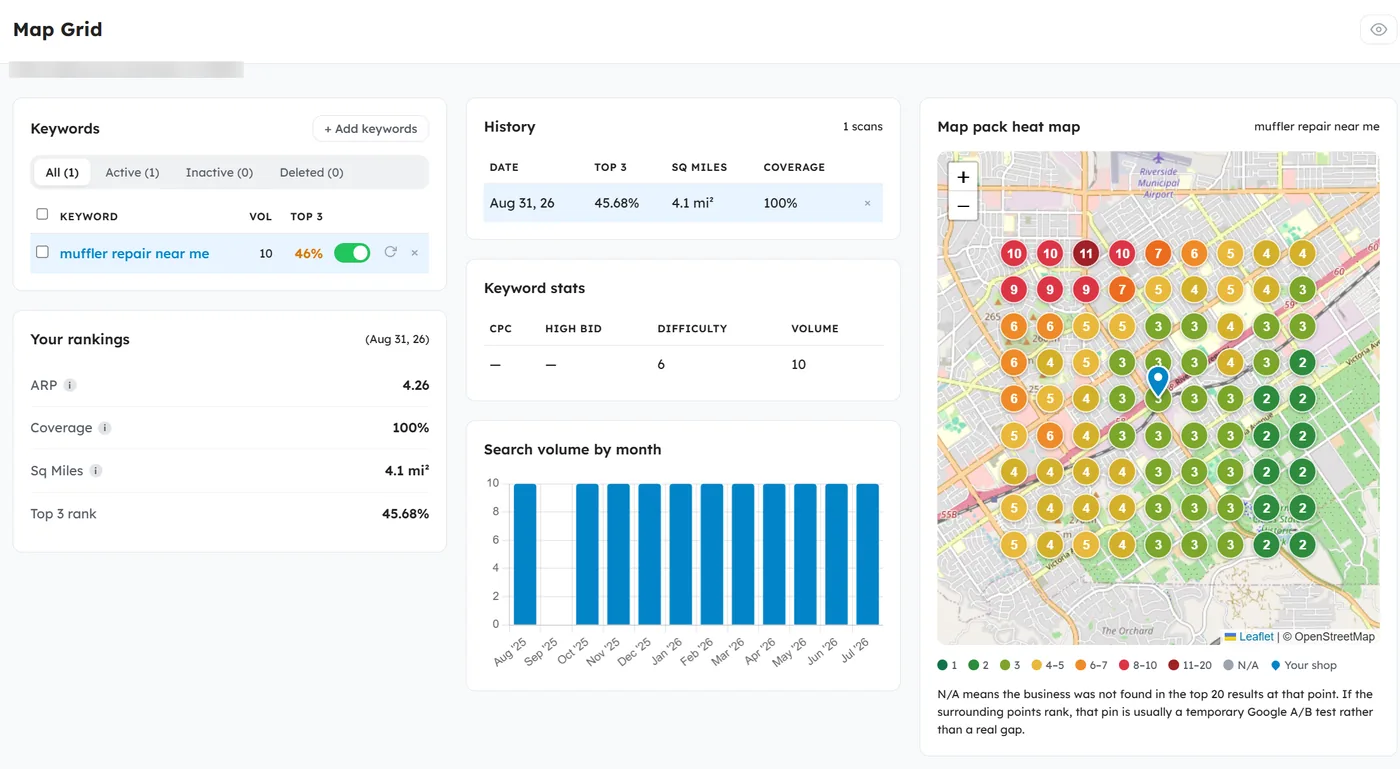
So we stopped measuring one spot. We scan a grid of coordinates across your service area and check the map pack at every single one — up to a 10-mile radius, from a 3×3 grid to a 15×15.

Heat map screenshot
Grid points coloured by rank position, with the shop pinned.
Capture the map card only, 1200px wide, from a grid with visible red/green spread.

Four Numbers That Actually Move

Every scan records the same metrics for every keyword, so month-over-month change is real change and not a different measurement.

Average Rank

Your mean position across every point on the grid. Points where you don't appear at all count against it, so it can't be flattered by the handful of spots you already win.

Coverage

The share of grid points where you show up anywhere in the top 20. This is your visibility floor — the map where Google will admit you exist.

Top 3 Share

The share of points where you rank 1–3. The map pack shows three results, so this is the number that turns into phone calls. It's the headline figure we hold ourselves to.

Square Miles Won

Your top-3 share applied to the area you're scanning, so improvement reads in territory rather than percentages. Note this is our own calculation — other tools use a fixed constant and will report a different figure.

Who Owns Your Area

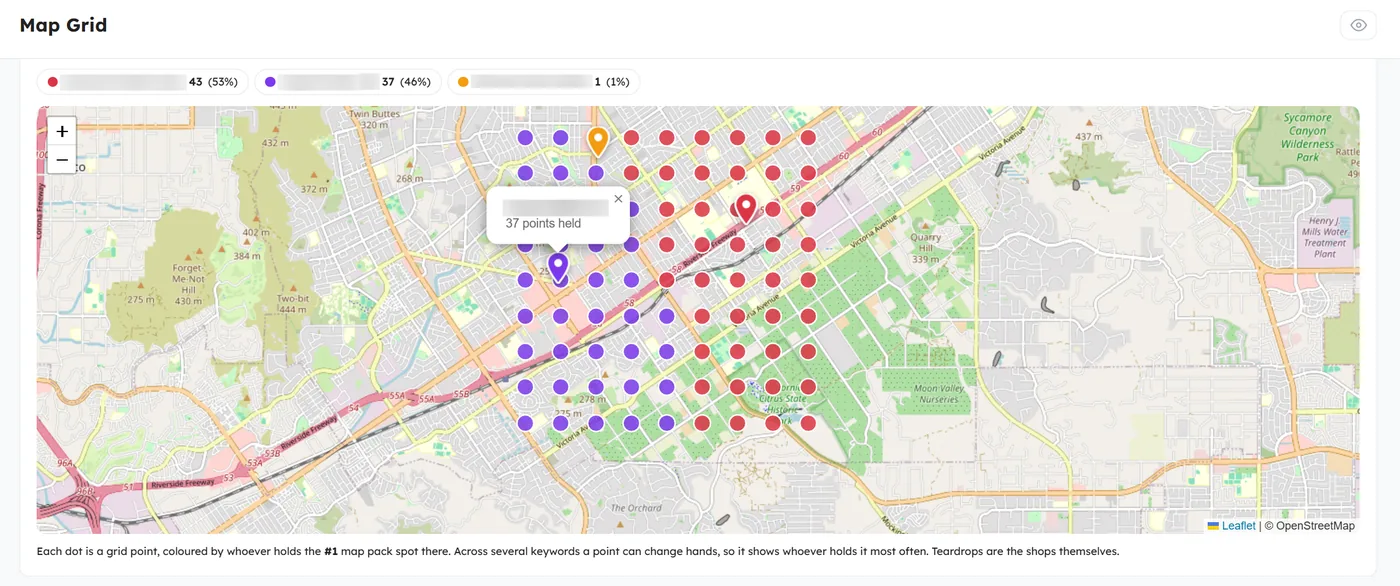
The same grid, coloured by whoever holds the #1 spot at each point rather than by where you rank. Every shop competing for your terms gets plotted in its own colour.

It reads like a political map of your town, and it answers a question owners actually ask: not "what's my rank," but "whose customers are these?"

Territory tracks shop location closely, because proximity works. The signal worth acting on is a competitor holding ground far from their own pin — or your patch being smaller than your position warrants.

Territory map screenshot
"Who owns your area" — include the colour legend and the caption below it.
This is the most striking image in the tool; capture it from a grid with at least three distinct owners.

Why One Competitor Keeps Beating You

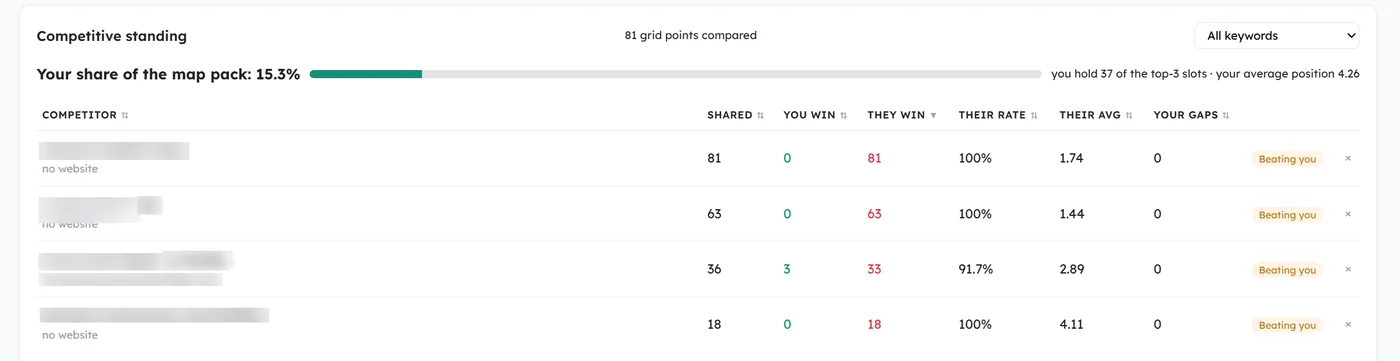
Click any rival and we'll show you the two businesses side by side: ratings, review counts, primary category, and a win/loss map with one pin per grid point — green where you rank better, red where they do.

Then we split their wins into two piles. Points that are closer to them are proximity, and there is nothing to fix. Points that are closer to you are a real deficit, and that's the number worth working.

The diagnosis is ordered by leverage, not by how loud the signal is. If your reviews are already ahead, it says so plainly rather than defaulting to "get more reviews" — usually the answer is a primary category mismatch, which Google weights far above the rest.

Competitor deep-dive screenshot
Profile comparison, the "why they're winning" findings, and the battle map.
Blur competitor names before publishing.

The Scan Is the Start, Not the Deliverable

A map that shows you're losing is only useful if something follows it. Every scan feeds two things we actually act on.

A Ranked List of Fixes

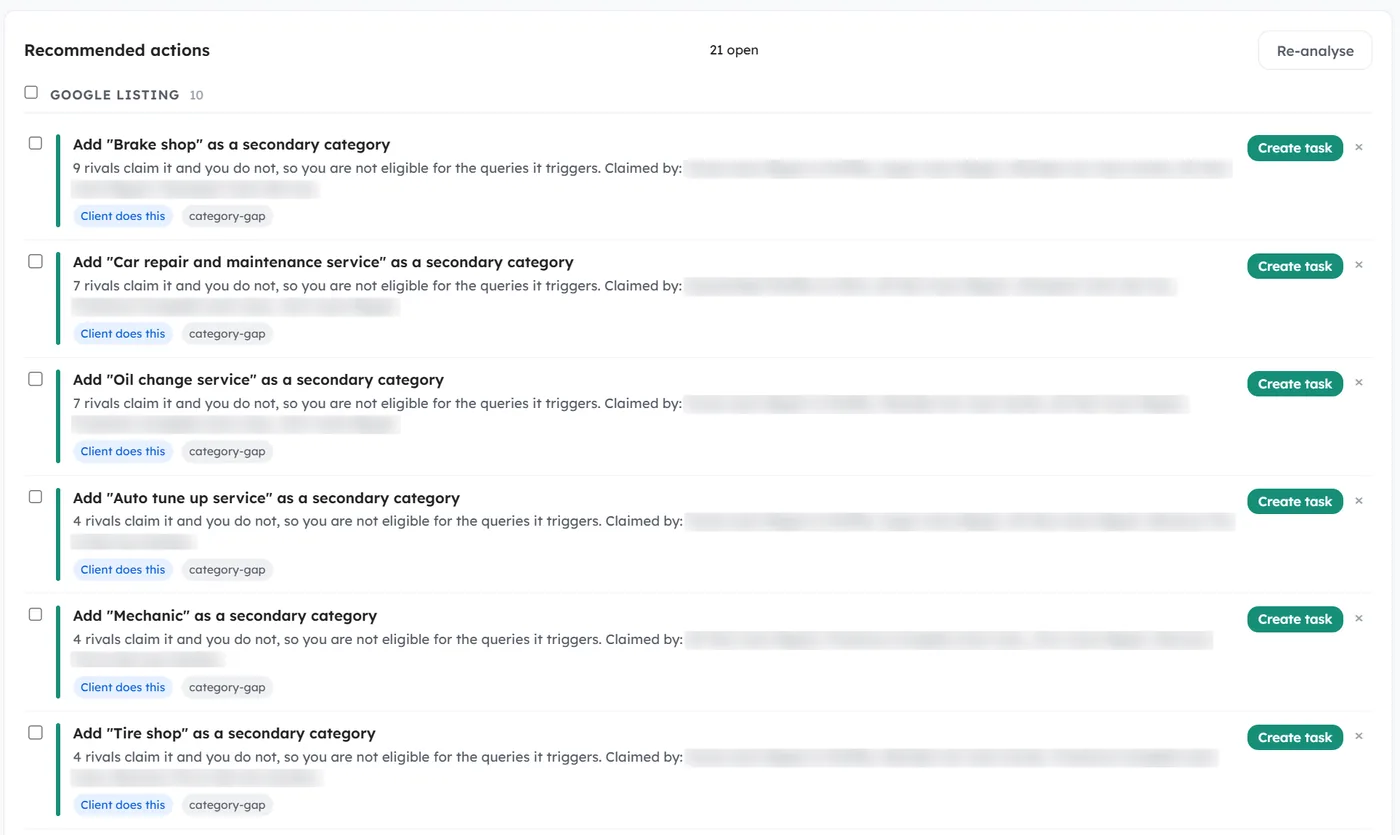
Thirteen deterministic rules read every scan and produce specific work: a primary category that doesn't match what you actually do, categories your rivals claim and you don't, coverage that collapsed since last month, a keyword that died. Each one lands on the project task board rather than in a PDF.

Keywords Your Rivals Already Own

Every scan harvests the businesses ranking around you for free, then mines them two ways: the Google Business Profile categories they claim and you don't, and the terms their websites already rank for. Both are filtered so an adjacent trade can't put irrelevant keywords in front of you.

Recommendations screenshot
Four to six rows from the recommended-actions panel.
Crop out the CRM sidebar entirely, and make sure no per-scan API cost is visible.

This Isn't Software You Buy

We built this because the tools we were paying for didn't answer the question we actually had. There's no signup, no login, and nothing to subscribe to — we run it for the clients whose local search we're responsible for, and it's how we decide what to work on next.

If that's the arrangement you want, the scan is where we start. If you just want to see your own map once, we'll run it and send it to you. That offer is real and it doesn't come with a call you have to sit through.

Common Questions

Grid Scanning, Explained

Instead of checking your ranking once, we check it from many points laid out in a grid across your service area — then colour each point by where you actually placed in the map pack. The result is a map of your visibility rather than a single number.
Proximity is the strongest factor in map pack rankings, so your results decay with distance from your address. That decay is normal and can't be removed, but how fast it happens is not fixed — profile completeness, primary category, and reviews all change how far your ranking carries.
Up to a 10-mile radius, on grids from 3×3 up to 15×15 points. We usually start at 1.5 miles, because every headline metric is a share of the grid — widen the radius and coverage mechanically drops even though nothing about your rankings changed. We fix the radius per client and never move it mid-history.
Monthly and automatically for every client on a local campaign, plus on demand whenever we've shipped a change worth measuring. Each scan is stored, so the trend is a record rather than a snapshot.
No — there's no login to buy. We run it as part of a local SEO engagement, and clients see the maps and the trend in their reporting. If you only want a one-off look at your own market, ask and we'll run it for you.
A rank tracker answers "what position am I in." A grid answers "where am I visible, and to whom." For a business whose customers are chosen by distance — an auto shop, a contractor, a clinic — the second question is the one that predicts the phone ringing.

Want to See Your Own Map?

Tell us your business name and the area you serve. We'll run a grid scan and send you the result — the heat map, who owns your territory, and the two or three things we'd fix first.