
User journey mapping is the process of creating a visual story of how a customer interacts with your business. Think of it as a blueprint that lets you see your website and sales process exactly as they do, revealing every spot where they get stuck, confused, or frustrated enough to leave.
Why Your Website Is Quietly Losing Money
If your website gets traffic but isn't bringing in leads, it's not bad luck—it's a broken process. Many business owners pour money into a great-looking site but overlook the actual path a customer has to take. They treat their website like a digital brochure, hoping people will magically figure out what to do next. This is a quiet but costly mistake.
Without a map of your customer’s experience, you're flying blind. You don’t know why a potential client lands on your services page but never fills out the contact form. You can't pinpoint the exact moment a shopper abandons their cart. This guesswork leads directly to wasted ad spend and missed opportunities.

Seeing Your Business Through Your Customer's Eyes
User journey mapping forces you to step out of your own head and into your customer’s shoes. It isn't a complex academic theory; it's a practical diagnostic tool. By visualizing every step, you can finally identify the "friction points" killing your conversions.
A journey map doesn't just show you what customers do; it uncovers why they do it. It connects their actions to their motivations and emotions, providing the clarity you need to make improvements that actually drive revenue.
This process helps you answer the critical questions that directly impact your bottom line:
- Where are potential customers getting confused? Is your pricing a mess? Is your navigation impossible to follow?
- What information are they missing? Do they need more social proof, clearer service descriptions, or a simple FAQ section?
- How can we make it easier to buy? Can we simplify the checkout process or make that "Request a Quote" button stand out?
A high customer acquisition cost is a red flag that your website is bleeding money, making it crucial to master your customer acquisition cost calculation. By fixing the leaks in your customer’s journey, you make every marketing dollar work harder.
Before you spend more on ads, use our comprehensive web audit checklist to diagnose the problems you already have. It’s the first step toward turning your website from a passive brochure into an active, 24/7 salesperson.
What Is a User Journey Map? (And Why Should You Care?)
Let’s ditch the jargon. At its core, a user journey map is a story. It’s the story of a customer’s relationship with your business, told from their point of view. Think of it less like a spreadsheet and more like a visual diary of their entire experience.
Imagine you run an auto repair shop. A potential customer, let's call him Dave, hears a weird rattling noise in his car. His journey doesn't start on your homepage. It starts the moment he thinks, "Uh oh, what's that sound?"
The journey map follows Dave’s entire path. It tracks him from his initial Google search for "mechanic near me," to him reading your Google reviews, to him calling your shop to ask about diagnostics. It captures his thoughts ("Can I trust this place?"), his questions ("How much will this cost?"), and his feelings—the anxiety about a big repair bill, and the relief when your receptionist is friendly and helpful.
It's More Than Just a Flowchart
A basic flowchart shows you that Dave clicked from your homepage to your services page. That’s a fact. But a user journey map tells you the story behind that fact. It uncovers his goals, his motivations, and where he hit roadblocks.
This is where the magic happens. Knowing a visitor left your site is just data. Knowing they left because they couldn't find your phone number in under five seconds is a powerful insight. It’s a problem you can fix. This shift from data to insight is why 80% of customers say the experience a company provides is as important as its products.
The need for this understanding is growing fast. The global market for customer journey mapping software is set to jump from USD 1.2 billion in 2024 to USD 3.5 billion by 2033. But here's the kicker: only 34% of companies really have this figured out, leaving a huge opportunity for those who do. You can read more about these customer journey mapping market trends and see just how big this shift is.
The Core Components Of A User Journey Map
To build this visual story, you need a few key ingredients. Each one adds a crucial layer of detail, giving you a complete picture of your customer’s experience.
This table breaks down the essential elements that form a user journey map, explaining what each component is and why it's critical for your business.
| Component | What It Is | Why It Matters To Your Business |
|---|---|---|
| Persona | A detailed profile of your ideal customer. | Ensures you're mapping the journey for a real person, not a vague "user," making your insights far more accurate. |
| Stages | The major phases the customer goes through (e.g., Awareness, Consideration, Purchase). | Organizes the journey into logical chapters and shows how your customer's needs change over time. |
| Touchpoints | Any point of interaction with your business (website, ad, support email, social media post). | Pinpoints exactly where the experience is happening, showing you where to focus your efforts for the biggest impact. |
| Actions | The specific things a customer does at each stage (e.g., clicks a link, fills out a form, reads a review). | Reveals what your customers are actually doing, not just what you assume they're doing. |
| Emotions | The feelings a customer has along the way (e.g., confused, excited, frustrated, confident). | This is the secret sauce. It uncovers the "why" behind their actions and highlights your biggest problems and opportunities. |
By breaking down the experience into these pieces, you move from guessing what customers want to knowing what they need. It provides the clarity to make smart, strategic changes that don't just improve your website—they improve your entire business.
The Four Critical Stages Of The Customer Journey
Every customer, no matter what you sell, goes through a predictable process before they decide to buy from you. Think of it as a roadmap with four key stops. Understanding this journey is the secret to user journey mapping; it lets you meet people exactly where they are and guide them forward.
When you break the journey down, you can figure out precisely what a customer needs from you at each moment. That clarity is what transforms a generic website into a powerful tool that brings in leads and closes sales.

Stage 1: Awareness
This is square one. It’s that moment when a potential customer first realizes they have a problem and your business pops onto their radar. They are nowhere near ready to buy—they’re just starting to search for answers. At this point, they probably don't even know you exist.
They're hunting for information, not a sales pitch. Your job is to be the helpful, knowledgeable resource they find.
- Service Business Example: A homeowner hears a weird rattling sound coming from their air conditioner. Their first move? They Google "AC repair near me." Thanks to great local SEO, a contractor’s website is at the top of the search results. The homeowner clicks on a blog post, "5 Common AC Noises and What They Mean," and just like that, they've stepped into the contractor's world.
Stage 2: Consideration
Once someone knows they have a problem and has seen a few potential solutions, they enter the consideration phase. Now, the real comparison shopping begins. They’re sizing you up against your competitors, trying to figure out who’s legit and who they can trust.
This is where you build confidence. Your website needs to do the heavy lifting, answering their deeper questions and proving you’re the best choice.
Most businesses lose customers right here. If your site is missing clear service details, customer reviews, or examples of your work, you’ll become invisible to buyers doing their homework.
- E-commerce Example: A dog owner is on the hunt for a durable bed for their pup. They’ve narrowed it down to three online stores, including yours. When they land on your product page, they find detailed specs, high-res photos from every angle, and over 50 customer reviews with pictures. That builds trust in a way a simple product description never could.
Stage 3: Decision
This is the moment of truth. The customer has done their research, weighed their options, and is ready to pull the trigger. They’ve picked you, but the sale isn't a done deal yet. Any friction or confusion at this point can make them bolt.
Your goal here is simple: make the final step as easy as possible. Get rid of any obstacles and make it incredibly simple for them to pay you.
- Example: Impressed by the reviews, the shopper adds the dog bed to their cart. They head to checkout and are greeted by a clean, simple form that accepts Apple Pay. The pricing is transparent, with no surprise shipping costs tacked on at the end. The whole process takes less than 60 seconds, locking in the sale before they can second-guess.
Stage 4: Loyalty
The journey doesn't stop once the payment goes through. The final and arguably most profitable stage is turning that one-time buyer into a loyal fan. This phase is often overlooked, but it's where the real long-term value is built.
Great follow-up and continued support are everything here. To create a seamless experience across every interaction, it's worth exploring effective omnichannel marketing strategies. This approach keeps your brand experience consistent and positive long after the first sale.
A happy customer who feels taken care of is far more likely to come back and, even better, to tell their friends about you. That creates a powerful growth loop that keeps your business thriving.
How To Build Your First User Journey Map
Theory is one thing; practice is what gets results. This is where we stop talking about what a user journey map is and start building one. Forget the confusing jargon—this is a straightforward blueprint for seeing your business through your customer’s eyes.
We'll walk through five clear steps. To keep it grounded, let's pretend we're creating a map for a B2B company selling simple accounting software to small contracting businesses.
Step 1: Define Your Business Goals
Before you map your customer’s path, you need to know your own destination. What, exactly, are you trying to accomplish with this map? Don't just aim for "more sales." Get specific.
Your goal gives the entire exercise a purpose and ensures you’re focused on what matters. Without a clear objective, a journey map is just a pretty picture with no business value.
Example Goal: For our software company, a solid goal would be: "Increase free trial sign-ups from our website by 25% in the next quarter." This is specific, measurable, and gives us a clear lens to view the entire customer journey through.
Step 2: Create a Customer Persona
You can't map a journey for a faceless "user." You need to know precisely who you're mapping it for. A customer persona is a semi-fictional profile of your ideal client, built from real data and insights.
Give this person a name, a job, and get inside their head. What are their daily headaches? What are they trying to achieve?
- Persona Name: "Contractor Carlos"
- Role: Owner of a 5-person residential construction company.
- Goals: He wants to spend less time on paperwork and more time on job sites. He needs a simple way to track project expenses and invoices.
- Frustrations: Complicated software is a nightmare. His current spreadsheet system is a mess, and he feels overwhelmed. He’s sharp, but he isn’t a tech guru.
From here on, every step of the journey will be seen through Carlos's eyes.
Step 3: List All Customer Touchpoints
Touchpoints are any and every point of contact Contractor Carlos might have with your business. It's crucial to list them all, from the first time he hears your name to long after he’s a paying customer.
Think bigger than just your website.
- A Google ad he clicks.
- A blog post he finds titled, "Top 5 Accounting Mistakes Contractors Make."
- Your website's pricing page.
- The form to sign up for a free trial.
- The automated welcome email.
- A live chat with customer support a week later.
Each one of these is a "moment of truth" that shapes his entire experience.
Step 4: Map Actions and Emotions
This is where the real insight comes from. For each touchpoint, map out what Carlos is doing (his actions) and, just as importantly, how he is feeling (his emotions). The emotional element is what turns a basic flowchart into a powerful business tool.
A journey map's power lies in merging emotions, behaviors, and data. Modern maps often integrate real-time insights from web analytics and customer surveys, which is critical since a 'lack of data' often undermines traditional mapping efforts. Globally, 84% of customer-centric companies now focus on the mobile experience, which makes sense as mobile devices account for over half of all internet traffic. Businesses that excel at this see real growth, with Adobe reporting a 10% increase in annual growth and a 25% surge in close rates. To see how this applies in 2025, you can explore more research on customer experience pain points.
For instance, when Carlos lands on the pricing page (a touchpoint), his action is "comparing plans." His emotion might be "confused" if the tiers are unclear, or "confident" if the value is laid out plainly.
Step 5: Identify Friction and Opportunities
With the full journey laid out, you can step back and see the entire story. The final step is to analyze the map to pinpoint your biggest problems and most promising opportunities.
- Friction Point: Carlos feels "anxious" during sign-up (emotion) because the form asks for a credit card for a "free" trial (action). This is a huge roadblock.
- Opportunity: The blog post (touchpoint) made him feel "empowered" (emotion). How can you create more content like that to build trust earlier in his journey?
By spotting these moments, you're creating a prioritized action plan. You're no longer guessing where your website is broken; you have a data-backed roadmap for improvements that solve your customer’s real problems. For more on this, check out our guide on user experience design best practices to help you fix these friction points.
Actionable Steps Vs Common Mistakes In Journey Mapping
Building your first map can feel overwhelming, and it's easy to go off track. The goal is a useful tool, not just a pretty diagram. To help you stay focused, here’s a quick comparison of what to do versus what to avoid.
| Effective Action (What To Do) | Common Mistake (What To Avoid) |
|---|---|
| Start with a specific business goal. (e.g., "Reduce cart abandonment by 15%.") | Making the map "just because." (Creating a map without a clear problem to solve.) |
| Base your persona on real data. (Use interviews, surveys, and analytics.) | Inventing a persona from thin air. (Making up an "ideal" customer that doesn't exist.) |
| Map the entire journey, end-to-end. (Include awareness, post-purchase, and support.) | Focusing only on the website. (Ignoring social media, email, ads, and offline interactions.) |
| Focus on the customer's emotions. (Identify feelings like confusion, trust, or frustration.) | Only listing actions. (Creating a simple flowchart instead of a true experience map.) |
| Use the map to create an action plan. (Identify specific friction points and opportunities.) | Letting the map collect dust. (Treating it as a one-and-done project instead of a living tool.) |
Think of this table as your cheat sheet. Stick to the "What To Do" column, and you'll create a journey map that drives real, measurable improvements for your business.
How To Turn Your Map Into Measurable Profit
A user journey map is a fantastic tool, but its real value isn't in the document itself. A map that just sits in a folder is a wasted effort. The whole point is to turn it into an action plan that boosts your bottom line. This is where you translate customer insights into measurable business growth.
The process kicks off by looking at all the friction points and opportunities you've identified and asking a simple question: Which of these has the biggest impact on revenue? Your goal is to prioritize the fixes that will make you money, not just the ones that are easy.
This is a simple, five-step process that helps visualize the customer's path from their initial goal to identifying key opportunities.
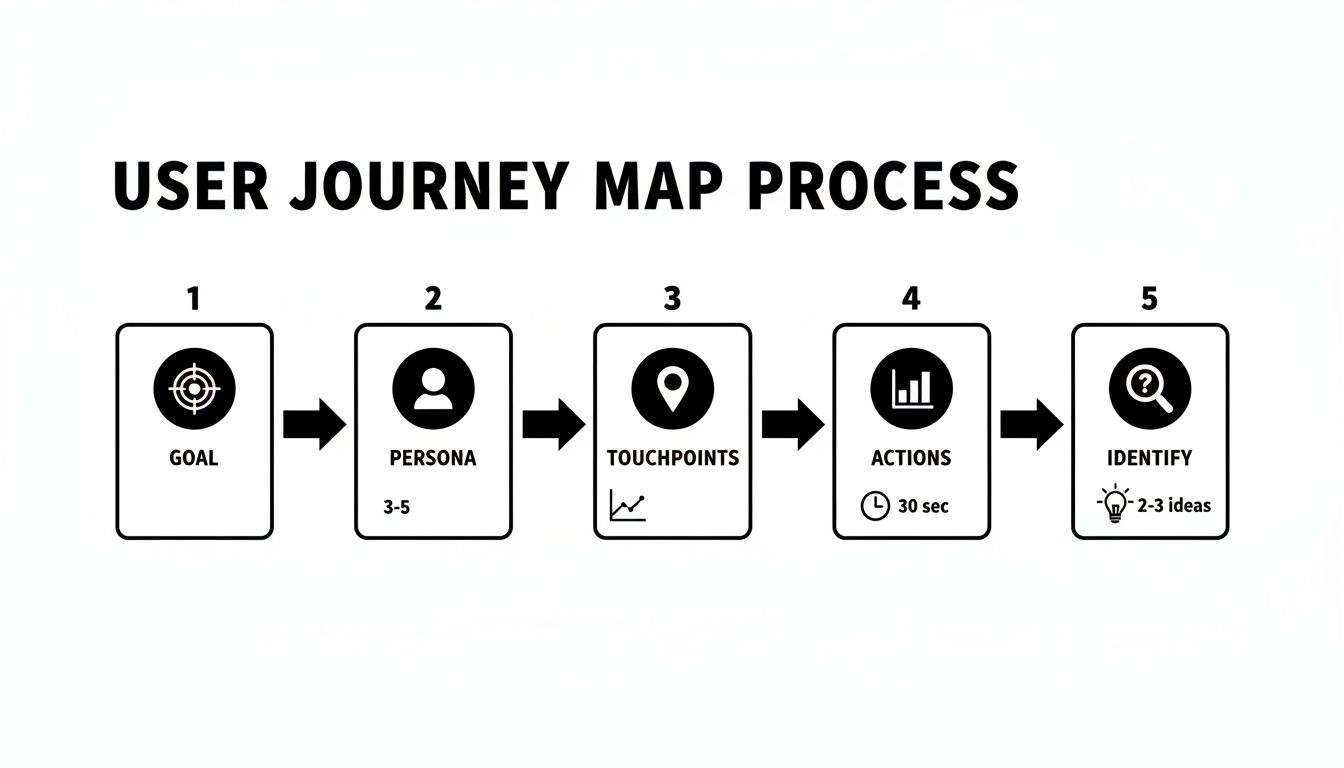
The map clearly lays out the building blocks—goals, personas, touchpoints, actions, and analysis—that you need to turn raw data into a strategic action plan.
From Friction Points to Action Items
Once you know your priorities, you can start turning each friction point into a specific, actionable task. This is how you connect the dots between a customer’s frustration and a concrete improvement to your website or marketing.
Here are a few real-world examples:
- For an e-commerce site: Your map shows a 40% drop-off at the shipping information stage. The friction is a lack of transparency. The action item? Add a shipping cost calculator to the product pages so customers see the full price upfront. No surprises.
- For a local contractor: The map reveals that potential customers land on your homepage from a Google Ad but leave without contacting you. The friction is a weak call-to-action. The fix? Add a bold "Request Your Free Estimate" button with a simple form right at the top of the page. Make it impossible to miss.
- For a dental office: Your map uncovers that new patients feel anxious because they can't find information about insurance. The friction is uncertainty. The solution? Create a dedicated "Insurance & Financing" page that clearly lists all accepted plans.
Each fix is a direct response to a real customer problem. That's why this approach gets results.
Connecting Actions to Key Metrics
Of course, every change you make needs to be tracked. If you don't measure, you're just guessing. The final step is to connect your action items to specific business metrics that prove whether your changes are working. This is how you demonstrate a clear return on investment.
A user journey map is your diagnostic tool. It tells you where the pain is. Your web analytics and sales data are how you measure if the treatment is working. The two must work together.
This process is at the core of what we do. It’s not about building a prettier website; it’s about engineering a more profitable customer experience. For a deeper dive into turning insights into sales, check out our guide on conversion rate optimization best practices.
The stakes are high—a happy customer tells about six people about their good experience, while an unhappy one complains to fifteen or more. By 2023, it was projected that 40% of organizations would be using AI to help map these journeys, seeing it as essential for delivering personalized experiences. As technology advances, this process is becoming even more powerful. In fact, 71% of marketers now see the need for more dynamic, AI-driven models to keep up.
Start Building A Website That Wins Customers
You've seen what a user journey map is and why it's so critical for growing your business. It probably got you thinking about your own website and where things might be falling through the cracks.
Moving From Insight to Implementation
The next step is turning those "aha!" moments into an asset that makes you money. Building a website that lines up perfectly with your customer's journey isn't just about a pretty design. It's about smart strategy, clear communication, and getting the conversion.
It’s about creating a system where your marketing, content, and sales efforts all work together to smoothly guide people from their very first click to their final purchase. That’s how you turn a static online brochure into a tireless salesperson that brings in revenue 24/7.
A great website answers customer questions before they're asked. By anticipating their needs at every stage, you build trust and make it easy for them to choose you over the competition.
If you’re tired of losing good leads because of a confusing or outdated website, maybe it's time for a chat. At Uncommon Web Design, we help business owners like you create websites that do more than just look good—they deliver real results.
Your Top User Journey Mapping Questions, Answered
Over the years, we've heard the same questions pop up when business owners first dig into user journey mapping. It's a powerful tool, but it's easy to get tangled up in the details. Here are clear, no-nonsense answers to the questions we hear most often.
How Often Should I Update My User Journey Map?
Think of your journey map as a living guide—not a "set it and forget it" project. Your customers change, your business evolves, and the market shifts. If your map doesn't keep up, it quickly becomes useless.
As a rule of thumb, revisit it at least once a year. However, you'll want to update it anytime something significant changes in your business. This could be:
- Launching a new product or service.
- Giving your website a major overhaul.
- Targeting a completely new type of customer.
- Making a big shift in your marketing strategy.
Keeping your map current ensures it remains a reliable tool for making smart decisions.
What's The Difference Between A User Journey Map And A Sales Funnel?
This is a great question and a common point of confusion. They're related, but they look at the world from two different perspectives. A sales funnel is all about your business. It’s a linear model that tracks how a prospect becomes a customer, focusing entirely on your conversion rates. It’s your view of the process.
A user journey map is 100% customer-centric. It’s their view of you.
A sales funnel tells you what is happening (e.g., "we lost 50% of users at the checkout page"). A user journey map helps you understand why it's happening (e.g., "users got frustrated because unexpected shipping costs popped up").
The journey map captures the whole messy, emotional, human experience—the questions, doubts, and points of frustration. A funnel gives you the hard data; a journey map gives you the story behind it.
Do I Need Expensive Software To Create A User Journey Map?
Not at all. When you're just starting out, fancy software can be more of a distraction than a help. The real value comes from the thinking process itself—from genuinely putting yourself in your customer’s shoes.
You can create an incredibly effective map using tools you already have:
- A whiteboard and sticky notes: A classic for a reason. It's hands-on, collaborative, and makes it easy to move things around.
- A big sheet of paper: Perfect if you're working on your own and just need to get the ideas out of your head.
- Free online tools: Platforms like Miro have fantastic free templates that are more than powerful enough to build your first map.
Don’t let the lack of a specific tool become an excuse. The clarity you'll gain from this process is far more valuable than any software subscription.
Ready to stop guessing and start building a website that guides customers from their first click to their final purchase? Uncommon Web Design creates strategic websites that turn traffic into measurable revenue. Book a no-obligation consultation today and let’s build a website that works as hard as you do.



