
Your biggest wins for a faster website come from three key areas: optimizing images, leveraging caching, and upgrading your hosting. These aren't just technical tweaks; they're strategic moves that tackle the most common speed bottlenecks we see on business websites, delivering immediate, noticeable improvements to your bottom line.
Why a Slow Website Is Actively Costing You Money
Let's get straight to the point. Your website's speed isn't a minor detail for a developer to worry about—it's a core business metric that directly impacts your revenue. As a business owner, you know every lead and every dollar counts. When a potential customer clicks your ad or a link to your site, you have just a few seconds to make your case. A slow-loading page slams that window shut before you even get a chance.
This is about more than just frustrating visitors; it's about burning cash. Think about the money you invest in Google Ads, SEO, or local marketing. If a qualified lead clicks through and your page takes six seconds to appear, they're gone. You literally just paid for a click that had zero chance of becoming a customer. That's a broken sales process.
The Financial Damage of Delays
The data here is eye-opening. A one-second delay in page load time can slash conversions by 7%. For a business doing $1 million in revenue, that’s $70,000 in lost sales. Annually. For e-commerce sites, it's even more stark: 40% of shoppers will abandon their cart if a site takes more than three seconds to load. Industry-wide, this adds up to an estimated $2.6 billion in lost sales each year. You can dig into how speed impacts sales in recent industry studies.
Your website isn’t just a digital brochure; it’s your 24/7 salesperson. If that salesperson is slow and unresponsive, they aren’t going to close many deals. It's that simple.
This infographic shows the real-world cost of a sluggish site on conversions, customer behavior, and your revenue.
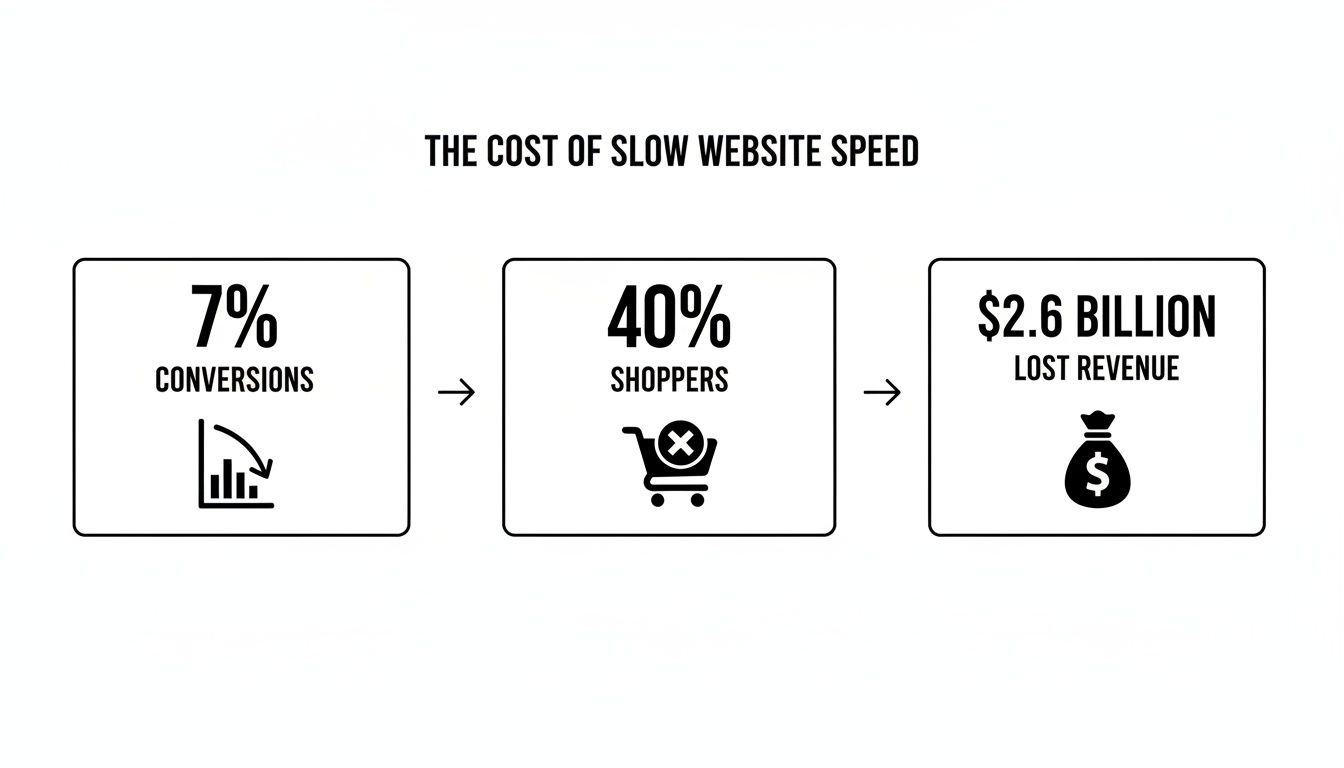
As you can see, even a seemingly small delay has massive consequences for your revenue and customer acquisition.
The table below gives you a clear look at how quickly visitors lose patience. Even going from one to three seconds is enough to send a third of your potential customers packing.
The High Cost of a Slow Website
This table shows the direct link between how long your page takes to load and the likelihood of a visitor giving up and leaving.
| Load Time (Seconds) | Increase in Bounce Rate Probability | Potential Conversion Loss |
|---|---|---|
| 1s to 3s | 32% | A third of your visitors might leave |
| 1s to 5s | 90% | The vast majority are gone |
| 1s to 6s | 106% | You've lost nearly everyone |
| 1s to 10s | 123% | Virtually no one is waiting this long |
The data is clear: the longer you make people wait, the more money you leave on the table.
In this guide, we'll skip the jargon and focus on business outcomes. We’ll cover things like Core Web Vitals, image optimization, and hosting, but we'll explain why they matter for turning clicks into customers. Our goal is to give you a straightforward, actionable playbook to turn your sluggish website into a high-performing asset that generates leads around the clock.
Immediate Fixes for a Faster Website
Before we get into server upgrades and code analysis, let's grab the low-hanging fruit. These are the quick wins that deliver the biggest impact for your time. For a busy business owner, this is where you'll see a real, tangible improvement almost instantly.
Let's start with the most common speed killer we see on nearly every website we audit: images.
Tame Your Images: The Biggest Speed Killer
If your website feels like it’s crawling, there’s a good chance your images are the culprit. They’re almost always the heaviest part of a webpage, making up the bulk of the data a visitor has to download.
It's not unusual for images to account for over 75% of a page's total weight. The good news is that by simply compressing your images, using modern formats, and enabling lazy loading, you can slash your load times dramatically. You can learn more about just how website assets impact load times and see the data for yourself.
Here are the three most effective actions you can take right now.
- Compress Your Images: This is non-negotiable. Before you upload any image, it needs to be compressed. This process intelligently shrinks the file size without a noticeable drop in visual quality. A 5MB photo from a professional shoot can often be trimmed down to under 200KB.
- Use Modern Formats: File types like WebP are a game-changer. They offer much smaller file sizes than old-school JPEGs or PNGs while keeping quality sharp. Most modern WordPress plugins or platforms can even convert your images to WebP automatically.
- Implement Lazy Loading: This clever trick tells the browser not to load images until they're about to scroll into view. This makes the initial page view load incredibly fast because the browser only grabs what's immediately visible.
For compression, we often recommend a tool like TinyPNG. It's dead simple—you drag and drop your files, and it does the work.

There’s no complex software to install. It's a straightforward, effective tool that anyone can use in seconds to make their site faster.
Leverage Browser Caching
Once your images are in check, the next quick win is browser caching. This simple but powerful technique makes your site load significantly faster for returning visitors.
Here’s how it works: The first time someone visits your site, their browser has to download everything—your logo, images, stylesheets, etc. Caching tells their browser to save some of these static files on their own computer. The next time they come back, their browser pulls the saved files from its local "cache" instead of downloading them all over again, and the page pops up almost instantly.
Think of it like a contractor visiting a job site. The first day, they bring all their tools. For the rest of the week, they leave the essentials on-site so they can get to work immediately each morning. That’s what caching does for your website.
If you’re on WordPress, a quality caching plugin like WP Rocket can handle this for you with a few clicks. It’s a "set it and forget it" fix that makes a world of difference for your repeat customers and leads.
Minify Your Code
Finally, let's touch on minification. This sounds technical, but the concept is simple. Your website's code—specifically CSS and JavaScript files—is full of extra spaces, comments, and line breaks that help developers read it.
To a web browser, all that extra stuff is useless clutter. Minification is an automated process that strips out this unnecessary fluff, making the code files much smaller and faster to download.
Smaller files mean a quicker download. Just like caching, this is a feature that quality hosting providers and performance plugins often handle automatically. It’s another small tweak that, when combined with optimized images and caching, adds up to a major improvement in your site's speed.
Your Hosting Is the Engine of Your Website
Think of your website's hosting plan as the engine in your company’s work truck. You can have the best paint job and the right tools in the back, but if you put a small, underpowered engine in a heavy-duty vehicle, it’s going to struggle. The same is true for your website.
Many business owners, trying to keep costs down, start with cheap, shared hosting. We see it all the time—it's one of the most common ways businesses unknowingly sabotage their own site speed. These budget plans cram your website onto a server with hundreds of other sites, all fighting over the same limited resources.
When another site on that server gets a traffic spike, everyone else slows to a crawl. It’s like being in a crowded apartment building with a single water pipe for everyone. Sure, it’s cheap, but you pay for it with poor performance and lost customers.

Beyond Shared Hosting: High-Performance Alternatives
This is where investing in a better "engine" pays off. High-performance managed hosting gives your website its own dedicated resources, ensuring consistent speed no matter what your "neighbors" are doing. It's the difference between that crowded apartment and a single-family home with its own dedicated utilities.
It's undeniable: your hosting choice is fundamental to performance. Understanding how your hosting service affects website speed is the first step toward building a faster, more reliable online presence. A quality host doesn't just rent you server space; they provide the managed infrastructure that keeps your site fast and secure.
Investing in quality hosting isn't an expense; it's a strategic move to protect your lead generation. A faster site means better user experience, stronger SEO rankings, and ultimately, more conversions from the traffic you’re already paying for.
Making the right choice can feel overwhelming. If you need a hand navigating the options, you can explore our detailed resource: https://uncommonwebdesign.com/hosting/a-decisive-guide-10-aspects-to-contemplate-when-selecting-the-ideal-web-hosting-service/ to see what factors matter most for a business like yours.
What Is a Content Delivery Network (or CDN)?
Another powerful tool often included with premium hosting is a Content Delivery Network (CDN). A CDN is a network of servers strategically placed around the world. It works by storing copies of your website's static files—like images and code—on these global servers.
When a customer visits your site, the CDN delivers those files from the server that is physically closest to them.
- Real-World Scenario: Let's say your main server is in Chicago. If a potential client from Miami visits your site, a CDN can serve your images from a server in Atlanta. This dramatically cuts down the physical distance the data has to travel, making your site load much faster for that user.
This process reduces latency and speeds up content delivery for every visitor, no matter their location. For businesses serving customers across the country or even just a large state, a CDN is non-negotiable for delivering a consistently fast experience.
Technical Details That Make a Difference
Finally, a good hosting environment handles critical behind-the-scenes technologies that impact speed. You don't need to be an expert on these, but it helps to know why they matter.
- Updated PHP Versions: PHP is the programming language that powers WordPress. Each new version is faster and more secure than the last. A solid host will always keep you on a recent, stable version of PHP.
- HTTP/2 Protocol: This is a modern protocol for transferring data between a server and a browser. It allows browsers to download multiple files at once over a single connection, a massive speed improvement over the older standard that could only handle one file at a time.
Upgrading your hosting is one of the most impactful changes you can make to improve website speed. It provides the solid foundation all other optimizations rely on, ensuring your website supports your business growth instead of holding it back.
How to Tame Your WordPress Website
WordPress is the backbone for millions of businesses, and for good reason—it’s powerful and flexible. But that flexibility can also be its biggest performance trap. It's easy to bog down a website by piling on plugins or choosing a theme that looks great but is secretly bloated with messy code.
Over time, your site can become the digital equivalent of a cluttered work truck—stuffed with tools you rarely use, weighing it down and grinding it to a halt. Let's walk through how to clean house and get your WordPress site working for you, not against you.
Conduct a Ruthless Plugin Audit
When a WordPress site is slow, our first suspect is always the plugins. They’re fantastic for adding features, but each one you add is another piece of code that has to run and another potential drag on your load time.
Think of it this way: every plugin is an employee. Some are essential, hard-working members of the team. Others are just hanging around, drawing a salary (your server resources) without contributing. It’s time for a performance review.
A "plugin audit" is simple. Go through your list of installed plugins and ask one direct question for each one: "Does this directly help me get more leads or sales?" If the answer is no, or if you can't remember why you installed it, it's time for it to go.
- Social media feed plugins? Often incredibly slow and rarely lead to actual business.
- Fancy slider plugins? Notoriously heavy on resources, and studies show they have poor engagement.
- Multiple plugins doing the same job? Pick the best one and delete the rest.
This isn't just about the number of plugins, but their quality. A single, poorly-coded plugin can do more damage than ten well-built ones combined. The goal is to be lean and intentional.
Your Theme Is Your Foundation
Just as critical as your plugins is your website's theme. Many off-the-shelf themes are packed with every feature imaginable to appeal to the widest audience. They come loaded with dozens of fonts, complex page builders, and flashy animations.
While this sounds great on the sales page, it creates a massive amount of code bloat. Your website ends up loading countless scripts and styles it doesn't even need, killing your performance before a visitor ever sees your content.
The average page load time for a WordPress site on a mobile device is a sluggish 13.25 seconds, a far cry from the 2.5 seconds users actually expect. This delay is often directly caused by bloated themes and an over-reliance on poorly-coded plugins. You can explore more data on how code impacts user expectations on Hostinger.
This is exactly why we often recommend a streamlined or custom approach. A well-coded theme built with performance in mind will always outperform a generic, one-size-fits-all template. It’s built to do exactly what your business needs—and nothing more.
Finding the Right Balance
Optimizing your WordPress site isn't about stripping it down to a boring page. It’s about being intentional. It means making strategic choices that put speed and user experience first, which is what actually drives results.
Here’s a practical checklist to get started:
- Deactivate and Delete Unused Plugins: If you're not using it, remove it completely.
- Research Lightweight Alternatives: Before adding a feature, look for plugins known for clean code and good performance.
- Evaluate Your Theme: Run your site through Google's PageSpeed Insights. If your theme is the source of major slowdowns, it might be time to consider an upgrade.
- Keep Everything Updated: Outdated plugins, themes, and WordPress itself can have serious security and performance issues. Stay on top of updates.
By cleaning up your plugins and ensuring your theme is a solid, lean foundation, you’re not just making your site faster—you’re building a more reliable sales tool. This, combined with the right infrastructure, is key. If you are also considering your hosting environment, we've outlined some of the best managed WordPress hosting providers that specialize in speed and security.
Measuring Speed: The Metrics That Actually Matter
You can't improve what you don't measure. But if you’ve ever used a speed testing tool, you've probably been hit with a wall of confusing acronyms and technical scores. Let’s cut through the noise and focus on what truly impacts your business.
This isn't about chasing a perfect 100/100 score. It's about understanding what your potential customers actually experience when they land on your site. For a business owner, a speed test is a diagnostic tool. The final number doesn't matter nearly as much as the specific, actionable problems it uncovers.
Introducing Google's Core Web Vitals
A few years ago, Google introduced Core Web Vitals, giving us a clear signal about what they value most. These are three specific metrics built to measure the real-world user experience of a webpage. If you want to rank well on Google and convert visitors, these are the scores to watch.
Think of them as Google's way of asking three simple questions about your site:
- How fast does it load? (This is Largest Contentful Paint, or LCP)
- How quickly can I interact with it? (This is First Input Delay, or FID)
- Is the layout stable, or does it jump around? (This is Cumulative Layout Shift, or CLS)
Getting these right isn't just a technical exercise; it directly translates to more visitors sticking around, giving you more chances to turn them into customers. If you're looking for a structured way to evaluate these elements, our comprehensive web audit checklist can provide a clear roadmap.
You don’t need to be a developer to understand this. You just need to know that Google is grading your site on how it feels to a real human, and these are the metrics that define that feeling.
The gap between user expectation and reality can be staggering. While 47% of users expect a website to load in two seconds or less, the average mobile page takes a sluggish 8.6 seconds. Improving metrics like your LCP to under 2.5 seconds is no longer optional for businesses that rely on search traffic.
Breaking Down The Vitals
Let's quickly translate each of these metrics into plain English. Google created these to reflect key moments in a user's journey on a page.
Understanding Core Web Vitals
| Metric | What It Measures | Good Score |
|---|---|---|
| LCP (Largest Contentful Paint) | The time it takes for the largest image or text block on the screen to become visible. This is your user's primary perception of loading speed. | Under 2.5 seconds |
| FID (First Input Delay) | How quickly your page responds when a user first tries to interact with it, like clicking a button. This measures interactivity. | Under 100 milliseconds |
| CLS (Cumulative Layout Shift) | How much the content on your page unexpectedly moves or shifts around as it loads. This measures visual stability. | A score of 0.1 or less |
These vitals give you a clear, quantifiable way to see your site through your visitors' eyes.
You can check these scores for your own site using Google's free PageSpeed Insights tool. Just enter your URL, and it will give you a detailed report for both mobile and desktop.
How to Set Realistic Goals
When you get your first report, don't panic if your scores aren't perfect. The goal isn't to hit 100/100. The real win is moving your Core Web Vitals from the "red" (poor) or "orange" (needs improvement) zones into the "green" (good) zone.
Start by benchmarking your current performance. Run the test, save the report, and treat it as your baseline. From there, you can work through the fixes we've discussed—like image optimization and better hosting—and re-run the test to see the direct impact of your changes. This data-driven approach turns website optimization from a guessing game into a clear, strategic process that drives real results.
Your Realistic Website Speed Roadmap
Fixing your website's speed isn't a one-time project; it's a continuous process of making smart, prioritized choices. Let's pull everything together into a practical game plan. This is how you go from being overwhelmed by technical jargon to seeing measurable improvements in your leads and sales.
The key is to focus on what gives you the biggest impact first. You don't have to tackle everything at once. A strategic, phased approach means you're putting your time and money where it will deliver the fastest results.
The First Week: All About Quick Wins
Your first seven days should be dedicated to the low-hanging fruit. These are fixes that solve the most common speed traps without needing a developer on speed dial. Think of this as laying a proper foundation.
Here’s your punch list for this week:
- Be ruthless with image optimization. Go through your most important pages—your homepage and key service pages—and compress every single image. Convert them to WebP and ensure lazy loading is turned on. This one step alone can often slice your load time in half.
- Install a top-notch caching plugin. If you're on WordPress, this is a five-minute, non-negotiable task. A tool like WP Rocket can handle browser caching and code minification for you, giving returning visitors a noticeably faster experience.
- Run your first benchmark. Before you touch anything, go to Google's PageSpeed Insights and get your baseline score. This is your starting line. You can't celebrate the victories if you don't know where you started.
Just by checking these boxes, you'll likely see your Core Web Vitals improve significantly. This gives your users an immediate boost and sends a strong signal to Google that you're taking performance seriously.
The First Month: Building a Strong Foundation
With the quick wins under your belt, the first month is about reinforcing your website's core structure. This is where you attack the bigger, foundational problems that put a ceiling on how fast your site can ever truly be.
- Upgrade your hosting. Still on that $5/month shared hosting plan? It's time for an upgrade. Moving to quality managed hosting is the single biggest long-term investment you can make for your site’s speed, security, and reliability.
- Implement a Content Delivery Network (CDN). More than 40 million websites use a CDN because it dramatically speeds up content delivery by serving it from servers closer to your visitors. For businesses in competitive local markets, a CDN isn't a luxury; it's a foundational tool. Recent studies confirm the huge impact a CDN can have on load times.
- Conduct a plugin and theme audit. Now is the time for tough decisions. Take a hard look at every plugin you have installed. Get rid of anything you don't absolutely need and ask if your theme is bloated with features you never touch.
These foundational changes put your website on solid ground, ready to handle more traffic and convert more visitors without being dragged down by a weak server or clunky code.
Long-Term Success: Ongoing Maintenance
A fast website today can easily become a slow one tomorrow if you neglect it. Long-term success is about building a system for ongoing maintenance and monitoring.
A fast website isn't a project with an end date; it's a business asset that requires consistent upkeep. Just like your work truck needs regular oil changes, your website needs proactive maintenance to keep it running as a high-performing sales tool.
This means getting into a routine. Audit your plugins quarterly. Run regular performance checks with PageSpeed Insights. Stay on top of all your updates. To keep your site in peak condition, you need a repeatable process, like the one found in this ultimate website review checklist for perfect site performance. This approach turns performance from a reactive fire drill into a proactive strategy that protects your investment and ensures your digital storefront consistently drives business growth.
At Uncommon Web Design, we handle this entire roadmap for our clients—from the initial audit to ongoing maintenance. We turn your website into a reliable, high-performing asset that works 24/7 to attract and convert your ideal customers. If you're ready to stop worrying about site speed and start focusing on growth, let's talk.



