Let's get straight to the point. Your website isn't a digital brochure. It should be your hardest-working employee—a salesperson that’s on the clock 24/7, qualifying leads, answering customer questions, and building trust while you’re busy running the business.
Most websites fail at this. They exist, but they don't work. This guide explains why and shows you how to build a site that delivers a real return on investment.
Your Website Is a Salesperson, Not a Brochure

Too many business owners treat their website like a line item on a startup checklist. They get a basic site online, cross their fingers, and then wonder why the phone doesn't ring.
The problem starts with the wrong perspective. Your website isn’t a static placeholder. It’s an active, revenue-generating machine. Thinking of your website as a 24/7 salesperson completely changes how you approach its design and content. This mindset shift is the secret to unlocking actual growth.
An Automated Growth Engine
Think about it: you wouldn't hire a salesperson, hand them a logo t-shirt, and wish them luck. You’d train them. You’d give them scripts, talking points, and the tools they need to answer questions and close deals. Your website deserves that same strategic thinking.
A well-built site works tirelessly behind the scenes by:
- Qualifying Leads: It answers common questions upfront, so when someone finally contacts you, they're already informed and serious about moving forward.
- Building Credibility: It showcases your expertise with project galleries, glowing testimonials, and clear service descriptions, building trust before you ever have a conversation.
- Creating Predictability: It automates the top of your sales funnel, turning clicks into a reliable stream of qualified inquiries.
This frees you up. Instead of wasting time on cold calls or answering the same basic questions, you can focus on what you do best: closing deals with people who are already convinced you're the right choice.
Why Your Digital Front Door Matters More Than Ever
Not long ago, a website was a nice-to-have. Today, it’s non-negotiable. Customers expect you to have a professional online presence. When they can’t find one, they often assume you aren’t a legitimate business.
Your website is often the first interaction a potential customer has with your brand. It sets the tone, establishes your authority, and determines whether they click away or take the next step.
This is especially true for local businesses. Your customers are online right now, searching for everything from a dependable mechanic to a trustworthy contractor. When they find your site, they expect to see a professional hub that proves you’re a quality operation. Without that solid online presence, you're sending business straight to your competitors.
The Core Pages Every Business Website Needs
A great website isn't about having dozens of pages; it’s about having the right ones, each working to achieve a specific business goal. Think of your website like a small, efficient team. Each page has a distinct job, and when they all work together, the entire operation runs smoothly.
For most service businesses—from an HVAC contractor to a professional consultant—five core pages form the foundation of a site that builds trust and generates leads. These aren't just checklist items; they are strategic assets.
Your Homepage: The Digital Storefront
Your homepage is your digital curb appeal. It has about three seconds to answer a visitor’s three most important questions: What do you do? Who do you do it for? And why should I care? If it fails, they’ll leave without a second thought.
A great homepage isn't cluttered. It acts as a clear and confident guide. It immediately tells visitors they're in the right place and directs them to the next logical step, whether that's exploring your services or contacting you directly. Its one job is to make an instant connection and guide the user forward.
The About Page: Where You Build Real Trust
Many business owners mistakenly think the About page is for a dry company history. That's a huge missed opportunity. Your About page is your chance to build a genuine human connection and explain the "why" behind your business.
People do business with people they know, like, and trust. This is where you tell your story. Why did you start this company? What problem are you passionate about solving for your customers? A picture of you and your team can do more to build trust than a paragraph of corporate jargon ever could.
Services Pages: Clearly Articulate Your Value
A vague or confusing Services page is a lead-killer. This is where you move from building trust to demonstrating competence. Your goal is to clearly and confidently explain what you do, who you help, and the specific outcomes you deliver.
Avoid just listing services. Instead, frame each service around the problem it solves. For example, an auto shop doesn't just "offer oil changes"; they provide "preventative maintenance that keeps your car running reliably and saves you from costly future repairs." See the difference?
A Contact Page: Make It Easy to Connect
Your Contact page should have one purpose: to make getting in touch as effortless as possible. Every bit of friction here costs you leads. If a prospect has to hunt for your phone number or figure out a complicated form, many will simply give up.
The easier you make it for someone to take the next step, the more likely they are to do it. Remove every possible obstacle between your visitor and a conversation with you.
Provide multiple ways to get in touch—a phone number, an email address, and a simple contact form. For local businesses, embedding a map is crucial. The goal is to eliminate guesswork and make the process frictionless.
The Portfolio or Case Studies Page: Your Proof of Results
Finally, this is where you prove you can deliver on your promises. Testimonials are good, but a portfolio or case studies page provides tangible evidence of your work. This is where you show, not just tell.
For a contractor, this means a gallery of high-quality photos from past projects. For a consultant, it might mean a case study outlining a client's problem, the strategy you implemented, and the measurable results you achieved. This page is the ultimate credibility builder and often the final piece that convinces a prospect to reach out.
These core pages form a cohesive journey for your potential customers. The table below breaks down each page's role and the critical elements needed to make it work for your business.
Essential Website Pages and Their Business Purpose
| Page Type | Primary Goal | Must-Have Elements |
|---|---|---|
| Homepage | Make an instant connection and guide visitors to the next step. | Clear value proposition, compelling call-to-action (CTA), easy navigation. |
| About Page | Build trust and create a human connection with your audience. | Your story ("the why"), photos of you/your team, your mission or values. |
| Services Pages | Clearly explain your offerings and demonstrate your expertise. | Detailed descriptions, benefits (not just features), who the service is for. |
| Contact Page | Make it frictionless for potential customers to get in touch. | Phone number, email, simple form, physical address with a map (for local). |
| Portfolio / Case Studies | Provide undeniable proof of your skills and results. | High-quality images/videos, client testimonials, measurable outcomes. |
Understanding these roles is the first step. When each page performs its job correctly, your website transforms from an online brochure into a powerful tool that actively grows your business.
Designing for Conversions, Not Just Looks
A beautiful website that doesn't bring in business is just an expensive digital painting. The real test of website design for small businesses is its power to turn visitors into customers. This is where conversion-focused design comes in.
It’s not about design trends; it's about the timeless science of persuasion. The goal is to guide a visitor's attention, earn their trust, and make it ridiculously easy for them to take the next step. Every element—from the layout to the color of a button—needs a clear purpose that ties directly back to your business goals.
Guiding the Eye with Visual Hierarchy
The moment someone lands on your site, their eyes start scanning. Smart design takes control of that journey. We call this visual hierarchy, and it uses size, color, contrast, and placement to tell visitors, "Look here first, then over here, and finally, click this."
Imagine a local plumber's website. What's the most critical information? Their phone number and a big "Request Service" button. Those elements need to be impossible to miss—big, bright, and placed right where people look. The company's backstory? That can be smaller and tucked away.
By creating a clear path, you remove the guesswork. You create a smooth, intuitive experience that leads people straight to the action you want them to take.
The Power of a Great Call-to-Action
A Call-to-Action (CTA) asks the user to do something. But a lazy "Click Here" isn't going to cut it. The best CTAs are clear, compelling, and show the user what’s in it for them.
Instead of a button that says "Submit," try "Get Your Free Quote." Instead of "Contact Us," try "Schedule a Consultation." These small tweaks change a bland command into a genuinely helpful offer.
A few ground rules for CTAs that actually work:
- Be Specific: Tell people exactly what happens next. No surprises.
- Use Action Words: Start with strong verbs like "Get," "Download," or "Schedule."
- Create Contrast: Your CTA buttons should pop. They need to stand out visually from everything else on the page.
Good CTAs are the bridge between a visitor's interest and a new lead in your inbox. To go deeper, check out our guide on how to boost your website’s conversion rate with these proven strategies.
Building Instant Trust with Social Proof
Let's face it, people are skeptical. You can claim you're the best contractor in town all day long, but a potential customer will always trust another customer's word over yours. That's the power of social proof.
It's simply evidence from other people that you’re the real deal. You can build this trust almost instantly by featuring:
- Testimonials: Quotes from happy clients (with a name and photo, if possible).
- Case Studies: Quick stories that show a client's problem and how you fixed it.
- Client Logos: A gallery of reputable companies you've worked with.
- Reviews and Ratings: Pulling in positive Google or Yelp reviews directly onto your site.
Placing this proof right next to your CTAs is a powerful move. Seeing a five-star review beside a "Request a Quote" button can be the final nudge someone needs to get in touch.
Turn Your Website Into a Local SEO Powerhouse
Forget attracting customers from across the country. Your best customers are right in your backyard, and they're searching online for services like yours right now. This is where local search engine optimization (SEO) comes in, transforming your website into a magnet for nearby clients.
Think of local SEO as the digital version of a bright, impossible-to-miss sign on your storefront. It's about making sure that when someone in your area searches for what you do—like "plumber near me"—your business shows up at the top. You're not competing with the entire internet; you're focused on winning your local market.
Master Your Google Business Profile
Your Google Business Profile (GBP) is the most powerful local SEO tool you have, and it's completely free. This is the profile that appears in Google Maps and the "local pack"—that box of three businesses you see for most local searches. Leaving it unclaimed is like locking the front door of your shop and throwing away the key.
Getting this right is non-negotiable. It means:
- Completing Every Single Section: Don't skip anything. Fill out your business hours, list your services, upload quality photos, and write a detailed description. The more information you give Google, the more confidence it has in showing your business to customers.
- Keeping It Active: Regularly post updates, answer questions in the Q&A, and add new photos. An active profile signals to Google that you're open for business and ready to engage.
This one profile is often the first impression a local customer will have of you. Make it count.
The Foundation of Consistency: Name, Address, Phone
Google rewards businesses it can trust, and one of the biggest trust signals is consistency. Your business's Name, Address, and Phone number (NAP) must be identical everywhere it appears online. That means every directory, social media profile, and your own website.
Even tiny variations—like "St." versus "Street"—can create confusion for search engines and hurt your rankings. This rock-solid consistency builds a foundation of credibility that helps you climb higher in local search results.
In local search, Google acts like a meticulous detective. It cross-references your business information across the web. Every consistent entry builds a stronger case for your legitimacy; inconsistencies create doubt.
Target Keywords That Local Customers Actually Use
To attract local customers, you have to speak their language. That means targeting keywords that include your service area. Instead of just trying to rank for a generic term like "roofing services," you need to be aiming for "roofing services in Temecula" or "emergency roofer Murrieta."
Weave these location-specific phrases naturally throughout your website. A great strategy is to create dedicated pages for the main towns you serve. For instance, a local contractor could build out pages for "Home Remodeling in Menifee" and another for "Kitchen Renovations in Wildomar." This tells Google exactly where you operate, making your site the obvious choice for local searchers. To dive deeper, we have a complete guide on the core SEO benefits for small business owners.
The Unbeatable Power of Customer Reviews
When a potential customer is choosing between two local businesses, what often tips the scales? Reviews. A steady stream of positive, recent reviews is one of the most powerful factors in local search rankings and in earning a customer's trust.
Your job is to make it easy for happy customers to leave you feedback. Don't be shy about asking. A simple follow-up email after a job is completed, with a direct link to your Google Business Profile review page, can work wonders. The easier you make it, the more likely you are to get that glowing five-star rating that convinces the next person to call you.
Understanding the Real Cost of Web Design
Let’s get right to it. The first question every business owner asks is, "How much is this going to cost?"
It’s a fair question, but a price tag doesn’t tell the whole story. The real cost of a website isn't just the number on the invoice; it's the long-term value it generates—or fails to generate—for your business.
Thinking of your website as a one-time expense is a path to disappointment. A better way to look at it is as an investment in a core business asset, just like a key piece of equipment or a new employee. You wouldn't hire the cheapest salesperson you could find, right? So why take that approach with the one salesperson who works for you 24/7?
The investment in website design for small businesses is about balancing initial cost with long-term capability. The goal isn't to find the cheapest option, but the one that delivers the greatest return.
Breaking Down Your Investment Options
You generally have three paths for building a website. Each has a different price tag and requires a different level of your time. The right choice depends on your specific business goals and resources.
-
DIY Website Builders (Squarespace, Wix): This is the most budget-friendly route upfront. For a low monthly fee, you get templates and a drag-and-drop editor. It can be a decent starting point, but it comes with real limitations in customization, scalability, and SEO. You're also trading money for your own time—time you could be spending running your business.
-
Hiring a Freelance Designer: A good freelancer offers more customization than a DIY builder at a more accessible price than a full agency. This is often a great middle ground, but your success hinges on finding the right person. You'll also likely have to manage the project yourself and may need to hire specialists for things like copywriting or advanced SEO.
-
Partnering with a Full-Service Agency: This is the highest initial investment, but what you’re paying for is a strategic partnership, not just a website. At Uncommon Web Design, we handle everything—strategy, design, development, content, and SEO—to build a comprehensive growth engine. This path is for business owners who see their website as a central pillar of their long-term growth plan.
A good agency also handles the foundational work needed to get you seen by local customers, which involves more than just launching the site.
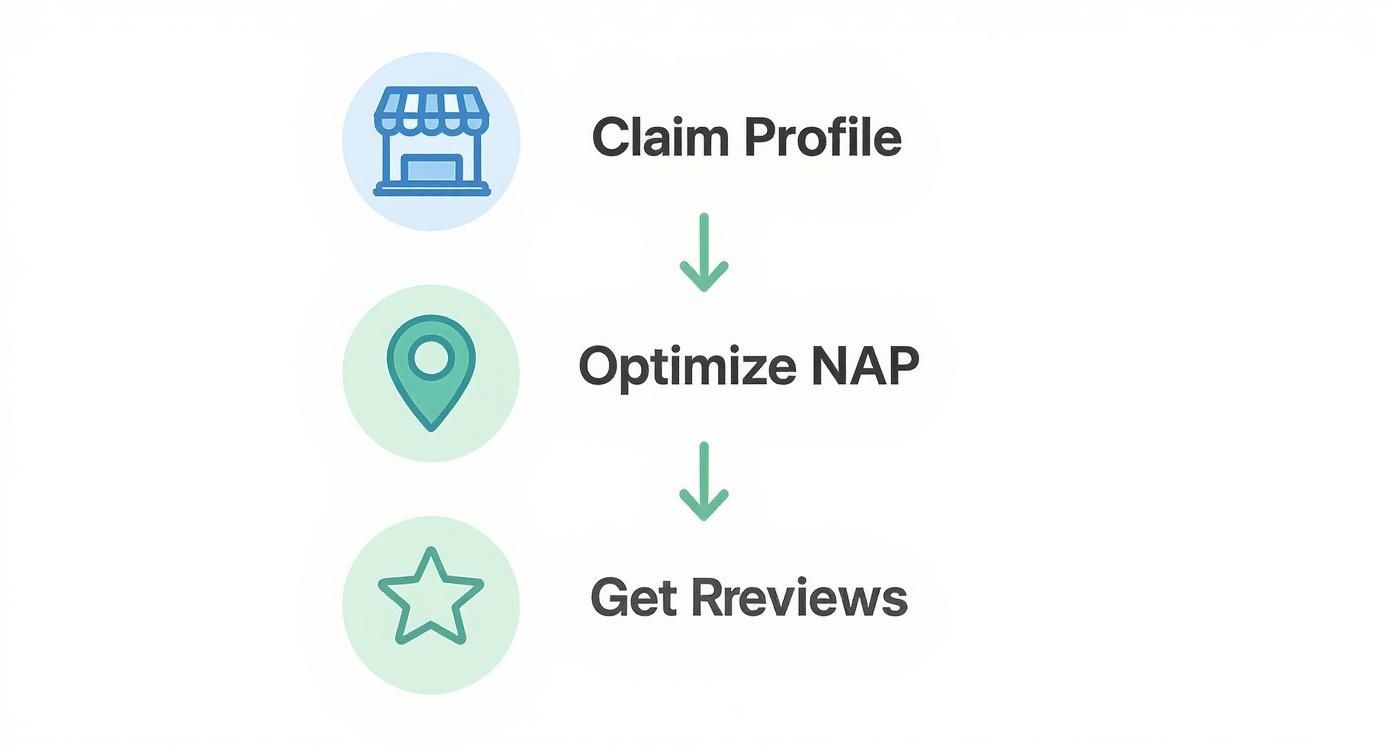
As you can see, getting found online is a process, not a one-time event.
Beyond the Initial Price Tag
The sticker price is just the beginning. To protect your investment, there are a few ongoing costs that are essential for keeping your site secure, fast, and functional. Neglecting them is like buying a new car and never changing the oil.
A website is a living asset, not a static document. Ongoing maintenance isn't an upsell; it's the essential service required to protect your investment and ensure it continues to generate results.
These crucial ongoing costs typically include:
- Hosting: The server space where your website files live.
- Security: Active protection against hackers, malware, and other threats.
- Maintenance: Regular software updates and performance checks to keep everything running smoothly.
The cost of website design for small businesses can vary widely, but a professional agency build typically ranges from $2,000 to $9,000, not including annual maintenance plans. While DIY builders like Wix, which holds about 45% of the website builder market, offer a cheaper entry point, the investment in a professional site is about building unique credibility and a powerful marketing tool.
You can read the full research on small business website statistics on Wix.com to see how these numbers reflect a serious commitment to growing online.
Your Top Website Design Questions Answered
We’ve covered a lot of ground, but as a business owner, you still have practical questions. Here are clear, direct answers to what we hear most often.
How Long Does It Take to Build a New Small Business Website?
A typical small business website takes 4 to 12 weeks from our first conversation to launch day. The timeline depends on complexity, the number of pages, and—this is a big one—how quickly you can provide the content and feedback we need.
A straightforward 5-page site for a local plumber will be on the faster end. A site with custom features like online booking or e-commerce will naturally take more time.
The most common delay is waiting on content—the words and photos. Having your core messaging and images ready can shave weeks off the process. At Uncommon Web Design, we use a structured process to keep things moving and give you a clear timeline from the start.
What Is the Difference Between a Custom and a Template Website?
This is a huge question that impacts your budget, brand, and future capabilities.
-
Template Website: This is what you get with platforms like Wix or Squarespace. You pick a pre-made layout and drop in your content. It's faster and cheaper upfront, but your site can end up looking generic, and you’ll eventually hit a wall when you want to add a feature the template doesn't support.
-
Custom Website: A custom site is built from a blank slate, designed and coded specifically for your business. It allows you to create a one-of-a-kind brand experience, guide customers exactly where you want them to go, and add any feature you can dream up.
Think of it like buying a suit. A template is off-the-rack—it might fit okay with a few tweaks. A custom website is tailored—it’s designed to fit your business perfectly from day one and gives you a real competitive advantage.
Is Ongoing Website Maintenance Really Necessary?
Yes. 100%. Skipping maintenance is like buying a new work truck and never changing the oil. It’ll run fine for a while, but you’re heading for an expensive breakdown.
Ongoing maintenance is essential protection for your investment. Here’s what it does:
- Keeps Your Site Secure: We constantly update your software to patch security holes before hackers can exploit them.
- Ensures Peak Performance: We run regular checks to keep your site loading fast. A slow site frustrates users and hurts your Google rankings.
- Prevents Things from Breaking: Technology changes. Maintenance ensures your site stays compatible and fully functional, preventing broken contact forms or your site going down completely.
A simple monthly plan is a small, predictable cost that protects the much larger investment you made in building the site in the first place.
How Can I Measure the ROI of My New Website?
Measuring return on investment (ROI) is all about defining what a "win" looks like for your business. Is it a phone call? A submitted contact form?
Once we know your goals, we install analytics to track these key performance indicators (KPIs). From there, we can figure out the real-world value of a lead by looking at your average customer value and sales closing rate. This shifts the conversation from fuzzy metrics to actual business results.
Here’s a quick example for a local contractor:
- Your new site brings in 20 qualified contact forms a month.
- You know you close about 25% of those leads.
- Your average job is worth $2,000.
The math is simple: 20 leads x 25% close rate = 5 new customers. At $2,000 each, that’s $10,000 in new monthly revenue that came directly from your website. This data-driven approach removes the guesswork and shows you exactly how your investment is paying off.
Ready to build a website that does more than just sit there? If you’re serious about turning your online presence into a 24/7 salesperson, we can help you map out a strategy that drives real, measurable growth.