
You launched your new website. It looks great, you're proud of it, but when you type your business name into Google… nothing. It’s a sinking feeling, but don’t panic. The reason your site is invisible is usually a simple technical oversight, not a major catastrophe.
Think of it like opening a brand-new shop but forgetting to flip the "Open" sign. You can have the best products in the world, but if customers can't get in the door, you won't make a single sale. Your website is no different.
Why Google Visibility Is Non-Negotiable
Let's be clear about the stakes. As of December 2025, Google holds over 90.83% of the search market. A staggering 9.5 million searches happen on Google every minute. If you’re a local contractor, auto shop, or dental office, being invisible on Google means you're invisible to nearly every potential customer actively looking for your services.
Before you dive into complex SEO strategies, let's start with the basics. Roughly 80% of the time, the "my site isn't on Google" problem comes down to a few fundamental checks. Think of this as your foundational diagnostic.
Initial Google Visibility Checklist
Here’s a quick-reference checklist. We'll break down each of these points, but this covers the most common culprits.
| Check | What It Means for Your Business | Why It Matters | How to Fix It |
|---|---|---|---|
| Google Search Console | You haven't claimed your digital property with Google. | This is your direct communication line with Google. Without it, you’re flying blind and can't diagnose indexing issues. | Go to Google Search Console and verify your site ownership via DNS, HTML file, or tag. |
noindex Tag |
A piece of code is telling Google, "Do not list this page." | Often left on by developers from the staging site, this tag acts as a digital "Keep Out" sign for search engines. | Inspect your page's source code for <meta name="robots" content="noindex"> and remove it. |
robots.txt File |
A file on your server is blocking Google's crawlers from accessing your site. | A single line (Disallow: /) can block your entire website from being found, making it completely invisible. |
Check yourdomain.com/robots.txt. Remove any restrictive "Disallow" rules that block important pages. |
| Sitemap Submission | You haven't given Google a map of all your important pages. | A sitemap helps Google find and index your content faster, ensuring your key service pages don't get missed. | Generate an XML sitemap (most modern websites do this automatically) and submit it in Google Search Console. |
Getting these four things right will solve the vast majority of "invisible website" issues. Now, let's explore what's involved in each step.
1. Get Your Keys to Google Search Console
Your absolute first move must be to set up and verify your site with Google Search Console (GSC). This free platform is your mission control for everything related to Google Search.
Think of it this way: without GSC, you’re just guessing. With it, Google tells you exactly what it sees, what problems it's having with your site, and how you’re performing. Verification is non-negotiable.

Once you're in, this dashboard becomes the command center for fixing indexing issues, monitoring performance, and seeing your site through Google's eyes.
2. Check for Accidental "Keep Out" Signs
It sounds too simple to be true, but countless new websites have a digital "Do Not Enter" sign up by mistake. This usually happens in one of two ways:
- The
noindexTag: This snippet of code in a page's header tells search engines, "Don't add this page to your database." Developers use this on staging sites to keep unfinished work private. The problem is, they sometimes forget to remove it when the site goes live. - A Restrictive
robots.txtFile: This text file gives bots instructions. A single line—Disallow: /—is a blanket command telling all search engines to stay away. It's a powerful tool that can render your site invisible if misconfigured.
These are five-minute checks that could instantly solve your entire problem. You can find both of these potential issues using the tools inside Google Search Console.
3. Hand Google a Map of Your Website
Okay, you've verified your site and confirmed you're not blocking Google. Now, make it incredibly easy for Google to find every important page by submitting a sitemap.
A sitemap is an XML file that lists all the URLs you want Google to know about. Submitting it via Google Search Console is like handing a delivery driver a perfect map with every address clearly marked. It ensures nothing gets missed.
Without a sitemap, Google has to discover your pages by following links from one to another. That process can be slow and might miss pages that aren't well-linked. A sitemap speeds everything up and is a fundamental best practice for any serious website.
Mastering these initial checks is critical. To see how these pieces fit into the bigger picture, you can learn more about how to improve website rankings in our comprehensive guide.
Using Google Search Console to Find Out What’s Really Going On
If the basic checks didn't turn up any smoking guns, it's time to use the single most important tool for any website owner: Google Search Console (GSC). This isn't just another analytics platform; it's a direct communication channel from Google about your website's health.
Think of it as the diagnostic report from your mechanic. It tells you exactly what Google sees, what it likes, and—most importantly—what it’s choosing to ignore.
Once you’re in, head to the Pages report under the 'Indexing' section. This is your mission control for understanding how Google interacts with every page on your site. The goal is to see your important pages in the "Indexed" column, but the real clues are hiding under "Not indexed."
It's normal to have some pages here, but the reasons Google gives for not indexing them are pure gold.
Understanding Google's Feedback
That list of reasons in the 'Pages' report can look like technical jargon, but it’s Google telling you exactly what the problem is. Let's cut through the noise and focus on the two most common culprits we see with clients.
-
Discovered – currently not indexed: This one’s a bit passive-aggressive. Google is saying, "Yep, we know this page exists, but we haven't gotten around to looking at it." Essentially, your page is on Google’s massive to-do list. If a key service page is stuck here, it’s a red flag that Google doesn’t see it as a priority.
-
Crawled – currently not indexed: This one is more direct. It means Google did visit your page, analyzed the content, and made a conscious decision that it wasn't worth adding to the search results. Ouch. This is almost always a sign that Google views the page as low-quality, duplicative, or simply not valuable to a searcher.
These aren't just abstract statuses; they are direct feedback telling you where to focus your energy.
Consultant Insight: A large number of 'Discovered' pages often points to poor internal linking—Google can't easily find a path to them. A high count of 'Crawled but not indexed' pages is a clear signal to significantly improve your content quality.
Why This Is a Business Problem, Not a Tech Problem
Every page that isn't indexed is an invisible asset, unable to attract customers or generate revenue.
Let's say you're a contractor in Temecula and you’ve just launched a beautiful new page showcasing your kitchen remodeling services. If that page is languishing under "Discovered – currently not indexed," every person in your area searching "kitchen remodeler in Temecula" is finding your competitors, not you.
Or imagine your dental practice in Murrieta has a page for "emergency dental care." If Google tags it as "Crawled – currently not indexed," it has decided your page isn't the best answer for someone in pain. You just lost a high-intent, high-value patient.
How to Turn Diagnosis Into Action
The good news is that GSC gives you a roadmap. You don't need to fix everything at once. Start with your "money pages"—the ones that describe your core services and drive revenue.
Here’s a practical game plan:
If You See "Discovered – currently not indexed":
- Build Better Internal Links: Go to your homepage or other important pages and find a natural way to link to the undiscovered page. This gives Google a clear path to follow, signaling that the page is important.
- Check Your Sitemap: Make sure the page is listed in the XML sitemap you submitted. If a page isn't on your official directory, you're making Google's job harder.
If You See "Crawled – currently not indexed":
- Conduct a Brutally Honest Content Review: Is the content thin? Does it sound like every other competitor's page? Does it truly solve a customer's problem? It’s time to add more detail, unique insights, customer photos, or testimonials.
- Hunt for Duplicate Content: Does this page sound almost identical to another page on your site? Google hates that. Combine similar pages into one powerful resource or rewrite them to offer unique value. Running a thorough web audit checklist is a great way to spot these hidden content issues.
After making these improvements, use the URL Inspection Tool at the top of GSC. Paste in the page's URL and click "Request Indexing." This tells Google, "Hey, I've updated this page, please come take another look."
Is Your Content the Real Reason You're Invisible?
Alright, you’ve checked all the technical boxes. Your site isn’t being actively blocked from Google. So, what’s next? It's time to look beyond the code and into your content.
Sometimes, the hard truth is that your website isn’t showing up because the content just isn't good enough. Google’s business model depends on giving users the best answer to their questions. If your pages are thin, generic, or only talk about yourself, Google will always serve up a competitor who does a better job of satisfying the searcher.
This is where we shift from technical fixes to business strategy.
This flowchart shows how Google thinks about a page—from first discovering it, to crawling it for quality, and finally, indexing it for search results.
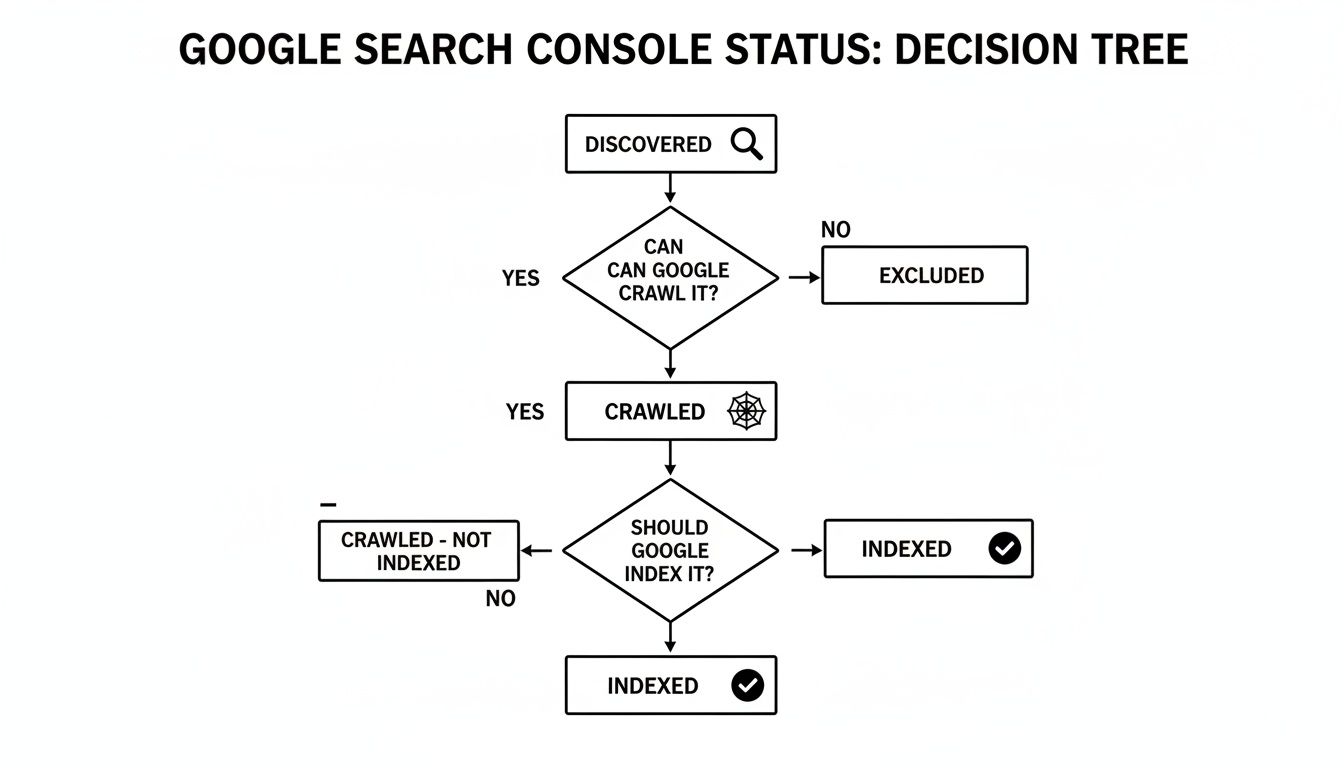
If your pages get "Crawled" but never make it to "Indexed," that’s a massive red flag. Google is telling you the quality isn't there.
The Problem With a Vague “Services” Page
One of the most common mistakes we see is businesses cramming everything they do onto one generic "Services" page. For a local business, this is a ranking killer.
Think about it: nobody in Menifee is actually searching for "contractor services." They’re searching for something specific, like "kitchen remodeling in Menifee" or "custom patio builder near me." A single page vaguely listing everything from roofing to plumbing is a master of none. It tells Google you aren't an expert in anything specific, making it nearly impossible to rank.
- What Doesn't Work: A "Services" page listing roofing, siding, and windows.
- What Ranks: A dedicated page for "Asphalt Shingle Roofing in Temecula" that details the process, materials, and benefits for local homes.
That level of detail doesn't just help Google; it helps your potential customers. It shows you understand their specific needs.
Are You Answering the Right Questions?
Great content starts with understanding search intent—the "why" behind a search. Is someone just looking for information? Are they comparing options? Or are they ready to hire you right now?
Your website has to speak to people at every stage. A blog post on "types of flooring for high-traffic homes" grabs people in the research phase. A dedicated "Hardwood Floor Installation" page with a clear 'Get a Quote' button serves those ready to buy.
If your content isn't built for your ideal customer, it's a huge reason for your invisibility. Learning how to write SEO articles that consistently rank is critical. If every page on your site is a hard sell, you're alienating the 90% of potential customers who are still just trying to figure things out.
Building Trust Through Your Content
Finally, Google doesn't just rank information; it ranks trust. You've probably heard of E-A-T (Expertise, Authoritativeness, and Trustworthiness). It’s the framework Google uses to evaluate your credibility. You can't just claim to be the best auto shop in Murrieta—you have to prove it.
This isn’t about fluffy marketing. It’s about building tangible proof on your site.
- Show Your Work: Post detailed case studies of recent jobs. If you're a contractor, this means before-and-after photos and a short story about the project.
- Let Customers Do the Talking: Feature real testimonials and reviews right on your service pages. Video testimonials are pure gold.
- Tell Your Story: Your 'About Us' page is a powerful trust signal. Don’t just list your founding date. Talk about your team, your values, and why you do what you do. It humanizes your business.
Without these trust signals, your site is just another anonymous URL. By investing in content that demonstrates your expertise and answers real customer questions, you give Google exactly what it’s looking for.
Uncovering Technical SEO Issues That Block Rankings
Even with the perfect message, your website can be invisible if it’s weighed down by technical issues. These are the behind-the-scenes problems that frustrate users and prevent Google from properly ranking your site.
Think of your website like a high-performance engine. Your content is the fuel, but if the wiring is a mess, you're not going anywhere. Technical SEO is about tuning that engine for both visitors and search engines.
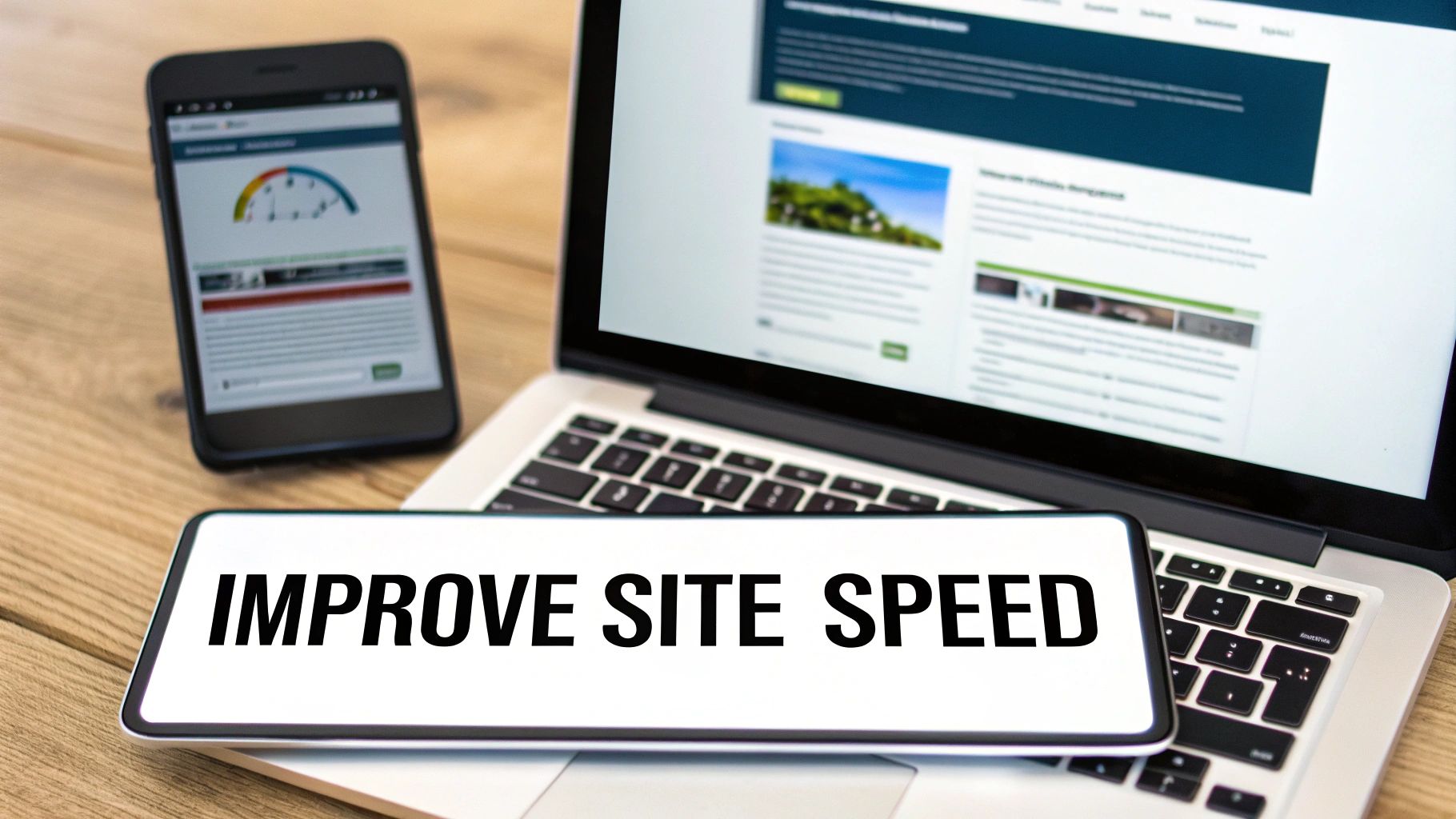
This screenshot from Google's PageSpeed Insights shows a performance report, your best starting point for diagnosing what's slowing you down. Key metrics here tell you how long users wait for your most important content to appear.
Is Your Website’s Speed Costing You Customers?
Let’s get straight to the point: a slow website is a broken website. In the eyes of both your customers and Google, speed is a direct reflection of your quality. If a potential customer clicks on your site and has to wait more than a few seconds, they are gone—often to a competitor.
This isn't a hunch; it's a measurable business problem. A slow site leads to a high bounce rate, which signals to Google that users are having a bad experience. Google will naturally demote slow sites in favor of faster competitors.
You can get a free report on your site’s performance using Google's PageSpeed Insights tool. It will give you a score and a list of specific issues to fix. The most common culprits are:
- Massive image files: Photos that haven't been compressed for the web can be the single biggest drag on your load time.
- Clunky code: An overload of plugins on a WordPress site can slow everything to a crawl.
- Poor server response time: Sometimes the issue is a low-quality hosting plan that just can't keep up.
Fixing these issues is often a quick win with a huge impact. For a deeper dive, check out our guide on how to improve page load speed.
Mobile-Friendliness Is No Longer Optional
The majority of online searches now happen on a smartphone. If your website is a pain to use on a small screen, you are effectively invisible to most of your potential customers. Google switched to mobile-first indexing years ago, meaning it primarily uses the mobile version of your site to determine its rankings.
A non-mobile-friendly site where users have to pinch and zoom to read text is a sign that your business hasn't kept up with the times, and Google takes that signal seriously.
If your website isn’t designed for a phone, it isn’t designed for the modern customer. It’s that simple. A responsive design that adapts to any screen size is a foundational requirement today.
Security and Site Structure Matter More Than You Think
Two other technical elements play a huge role in your visibility: security and internal linking.
First, your site must be secure. If your URL starts with http:// instead of https://, you're telling users and Google that the connection isn't encrypted. Browsers will even warn visitors that your site is "Not Secure," which is a massive blow to your credibility. An SSL certificate (the 'S' in HTTPS) is a non-negotiable trust signal.
Second, your site's structure needs to be logical. Internal links—the links from one page on your site to another—act as a roadmap for Google. A well-structured site guides Google's crawlers from your homepage to your most important service pages, signaling which content is most valuable. A messy structure can leave key pages "orphaned," making them nearly impossible for Google to find.
The rise of AI-powered search alternatives reveals that Google's market position, while still dominant, is facing unprecedented competition that could explain shifts in traffic patterns. ChatGPT and other AI search platforms captured 17.1% of digital queries globally in Q4 2025. This shift is particularly pronounced among younger demographics, with users aged 13-24 allocating 17% of their search queries to ChatGPT versus Google's 74%. However, this competition isn't the primary reason most small business websites disappear from Google results. Instead, these trends highlight a critical insight: the search landscape is fragmenting, meaning businesses can no longer rely solely on Google visibility.
To ensure your website is properly optimized and avoids issues that block rankings, consult a comprehensive guide on mastering SEO for your company, covering technical, on-page, and local aspects.
Why Local Businesses Must Master Local SEO
For any business with a physical address or service area, all the technical checks and content strategies we’ve covered are only half the battle. If you run a law firm in Murrieta or a contracting business in Temecula, simply showing up on Google isn’t the goal.
You need to appear in the Google Map Pack—that coveted block of listings at the top of the search results, complete with a map, reviews, and a direct link to call. That’s where the magic happens for local businesses.
This is local SEO, and it plays by its own set of rules. It’s how you get in front of customers searching for "emergency plumber near me" or "best auto shop in Temecula." Without a solid local SEO strategy, you’re invisible to the most valuable customers in your own neighborhood.
Your Google Business Profile Is Your Digital Storefront
The foundation of local SEO is your Google Business Profile (GBP). Think of this free listing as your digital storefront. It’s what Google uses to place you in the Map Pack, and it’s often the first impression a potential customer has of your business. Leaving it incomplete is like boarding up the windows of your shop.
Optimizing your GBP isn’t a one-time task; it demands ongoing attention. Fill out every single section, making sure the information is complete and accurate. Pay close attention to these:
- Services: Don't just list one or two things. Detail every service you offer with clear descriptions.
- Photos: Use real, high-quality images of your team, your completed work, and your physical location.
- Business Hours: Always keep your hours current, especially for holidays.
- Q&A Section: Proactively answer common customer questions in this section.
A well-maintained profile gives Google the information it needs to confidently recommend you to local searchers.
The Critical Importance of NAP Consistency
One of the most powerful—and often overlooked—signals for local search is NAP consistency. That stands for your business Name, Address, and Phone number. Google cross-references this data across the web and needs to see the exact same information everywhere.
Tiny discrepancies can cause big problems. Using "St." on one directory and "Street" on another, or having an old phone number on Yelp, creates confusion for search engines. This erodes Google's trust and can hurt your local rankings.
Think of it like a background check for your business. If Google finds conflicting details, it starts to question your legitimacy. Perfect consistency is a non-negotiable trust signal that proves you are who and where you say you are.
Start by getting your GBP perfect. Then, audit major directories like Yelp, Angi, and other industry-specific sites to ensure every detail matches precisely.
Reviews Are a Ranking Factor, Not Just Social Proof
Customer reviews on your Google Business Profile are not just for show. They are a direct ranking factor. Google sees a steady stream of positive reviews as a clear sign that you run a legitimate, high-quality business.
You should make it a standard practice to encourage happy customers to leave a review. But don't stop there. Businesses that actively respond to all reviews—both glowing and critical—tend to perform better. A thoughtful response shows you’re engaged and value customer feedback.
Build Authority with Local Citations and Service Pages
Beyond your GBP, you need to build a broader local footprint online.
-
Local Citations: A citation is a mention of your business's NAP on another website, like a local Chamber of Commerce site or a trade association directory. The more relevant, high-quality citations you have, the more confident Google becomes in your location and legitimacy.
-
Location-Specific Service Pages: A generic "Our Services" page doesn't cut it. To attract high-intent searchers, you need dedicated pages for each service in each primary location you cover. A page titled "Emergency Plumbing in Temecula" is infinitely more powerful than a general plumbing page because it perfectly matches what a local customer is searching for.
Mastering local SEO isn’t about being seen everywhere. It’s about dominating your own backyard and ensuring that when local customers need you most, your business is the first one they see.
When It's Time to Stop Tinkering and Call a Pro
You’ve worked through every step. You’ve checked your settings, polished your content, and spent hours trying to crack the code of why your site is still invisible.
At some point, you have to ask a critical business question: what is my time really worth? If you've sunk 20 hours into a stubborn SEO problem that an expert could fix in a fraction of that time, those are hours you've stolen from running your business and serving your clients.
The DIY approach has its limits. Eventually, you hit a point of diminishing returns where your effort far outweighs the results.
The Tell-Tale Signs You Need Backup
Some issues aren't just minor speed bumps; they're indicators of deeper problems. Diving into these without a seasoned guide can easily make things worse.
Consider getting professional help if you're dealing with any of these:
- A Possible Google Penalty: Did your traffic nosedive out of nowhere? If you've ever dabbled in sketchy link schemes or thin content, a penalty could be the culprit. Getting out of Google jail is a delicate operation involving a deep audit, careful cleanup, and a formal reconsideration request. This isn't something to guess your way through.
- Deep-Seated Technical Issues: We're talking about untangling JavaScript rendering issues, resolving site-wide duplication errors, or performing a toxic backlink cleanup. These require specialized knowledge and professional-grade tools.
- You're Stuck in Neutral: You feel like you've done everything by the book—your content is solid, your local signals are strong, and the site is fast—but you’re still not getting the calls or leads you expected. An outside expert can spot the strategic blind spots you’re too close to see.
The real objective isn't just to show up on Google. It's about turning that visibility into a reliable engine that brings in new business. If your efforts aren't generating a tangible return, it's time for a new strategy.
This is where we come in. We don't just fix problems; we partner with businesses to build digital assets that become their 24/7 salesperson, consistently driving growth. We handle the complexities of SEO so you can focus on what you do best.
If you're done with the guesswork and want a clear, strategic path to results, let's talk. At Uncommon Web Design, we build websites that work as hard as you do. Schedule a consultation and let's explore how we can turn your website into your most valuable employee.



